
What Makes a Good Website

How to Turn Your Underperforming Website into a Lead‑Generating, Cost‑Saving Business Asset
Many B2B websites look fine but perform poorly. Here’s how to tell the difference, and what to fix first.
Your website is one of the most important assets in your business. For many field service companies it is also the most underused one. It sits there, looking fine on the surface, while quietly costing money and losing deals in the background.
In this guide, we walk through what actually makes a good website for a B2B field service company. Not just how it looks or whether it shows nicely on a phone, but whether it does the work it is supposed to do: creating efficiency for your business, attracting the right leads, and moving them toward a conversation with you.
Ninety percent of B2B purchasing decisions involve an online search at some point. That means your website is almost always part of the process, whether you realize it or not. The question is whether it has a clear purpose and is actively helping, or quietly getting in the way.
In this guide, you’ll audit nine areas:
- Technical foundations,
- Website structure,
- Web design and user interface,
- Content quality,
- Trust, proof, and authority,
- Conversion paths and clear calls to action,
- Search Engine Optimization
- Integration with your business systems and marketing channels,
- Measurement and analytics.
For each section you'll find quick 5–15 minute checks you can run without a developer to see whether your site is actually pulling its weight.
The Two Jobs of a B2B Website
Before we get into the specifics, we need to address a framing issue. Most business owners think of their website as a brochure with a domain name: it describes what they do, shows a few photos, and lists a phone number.
A good website has two jobs of equal importance:
- Reduce cost and increase efficiency by integrating with your business systems.
- Generate demand by attracting the right target audience and guiding them toward becoming leads.
We see companies invest heavily in one and ignore the other entirely. Both matter, and both need to be built in from the start, not bolted on later.
Using Your Website to Reduce Operational Cost and Increase Efficiency
This is the job that gets skipped most often. When we start working with a field service company, one of the first things we look at is how much manual effort is happening around business processes. Some of them are customer-facing, such as order taking, inquiry management, and answering basic questions. Other processes are internal, such as order processing, warehousing, and fulfillment.
There is an opportunity for saving cost and reducing human error whenever a piece of information exists on more than one system, or whenever your team needs to download information from one platform and upload it somewhere else, or manually enter information. In a surprising number of cases, a well-designed web platform could be handling much of this.
When your website connects to your field service management system, your ERP, or your CRM, something changes. Requests that used to take three steps now take one. Customer information flows directly into the right system without anyone typing it twice. Errors go down and efficiency goes up.
We worked with a client who was processing service inquiries manually, routing them by hand into their operations platform. After integrating their web forms directly with their FSM system, they recovered nearly a full day of admin time per week. The website change did not just look better, it improved how the business ran.
This is what we mean when we talk about a Marketing Operating System. Your website is not a standalone asset. It is one part of a connected set of systems that, when properly integrated, help your business run further and faster with the same team.
Attracting the Right Visitors and Turning Them into Leads
The second job is what most people think of when they think about good websites: getting found, engaging visitors, and converting them into leads.
In a B2B field service context, this is rarely a single-click transaction. A purchasing decision typically takes five to twelve touchpoints before a buyer is ready to talk. Many of those touchpoints can happen on your website and online presence, but only if it is built for that reality.
- Getting found starts with search. The vast majority of B2B purchasing decisions begin with a generic search engine query. Your website needs to show up when a potential customer is looking for what you do.
- Engaging visitors means giving them the content and the confidence to stay. A buyer who arrives at your site is not just looking for information. They are quietly evaluating whether you understand their world and whether you are worth trusting with their business.
- Converting visitors means having clear, low-friction paths that invite the right next step. Not just a phone number in the header. Structured offers with clear CTAs that match where a website visitor is in their journey.
We’ll cover each of these in more detail below.
Technical Foundations: Speed, Security, and Mobile Readiness
When the technical foundations are broken, nothing else works well. This is the baseline every successful website must meet. And it is worth checking, because we regularly see established companies with significant technical issues they are simply not aware of.
Your Site Needs to Load Fast
Web visitors are impatient. If a page takes more than three seconds to load, a significant portion of visitors will leave before they see anything. Page speed also directly affects your search engine ranking. A slow site is penalized in Google search results.
Your Site Needs Website Security
An SSL certificate is the minimum standard for website security. Your website address should start with “https,” not “http.” If it does not, modern browsers will flag your site as unsecured. That is not a good first impression for a B2B buyer evaluating whether to trust you with their operations.
Your Site Needs to Work on Mobile Devices
More than sixty percent of web traffic now comes from mobile devices. Google prioritizes mobile-friendly websites in its search results. If your site is difficult to read or navigate on a smartphone, you are losing both visitors and search visibility.
Quick Check: Technical Foundations Check (5 minutes)
- Check your website page speed with Google Page Insights
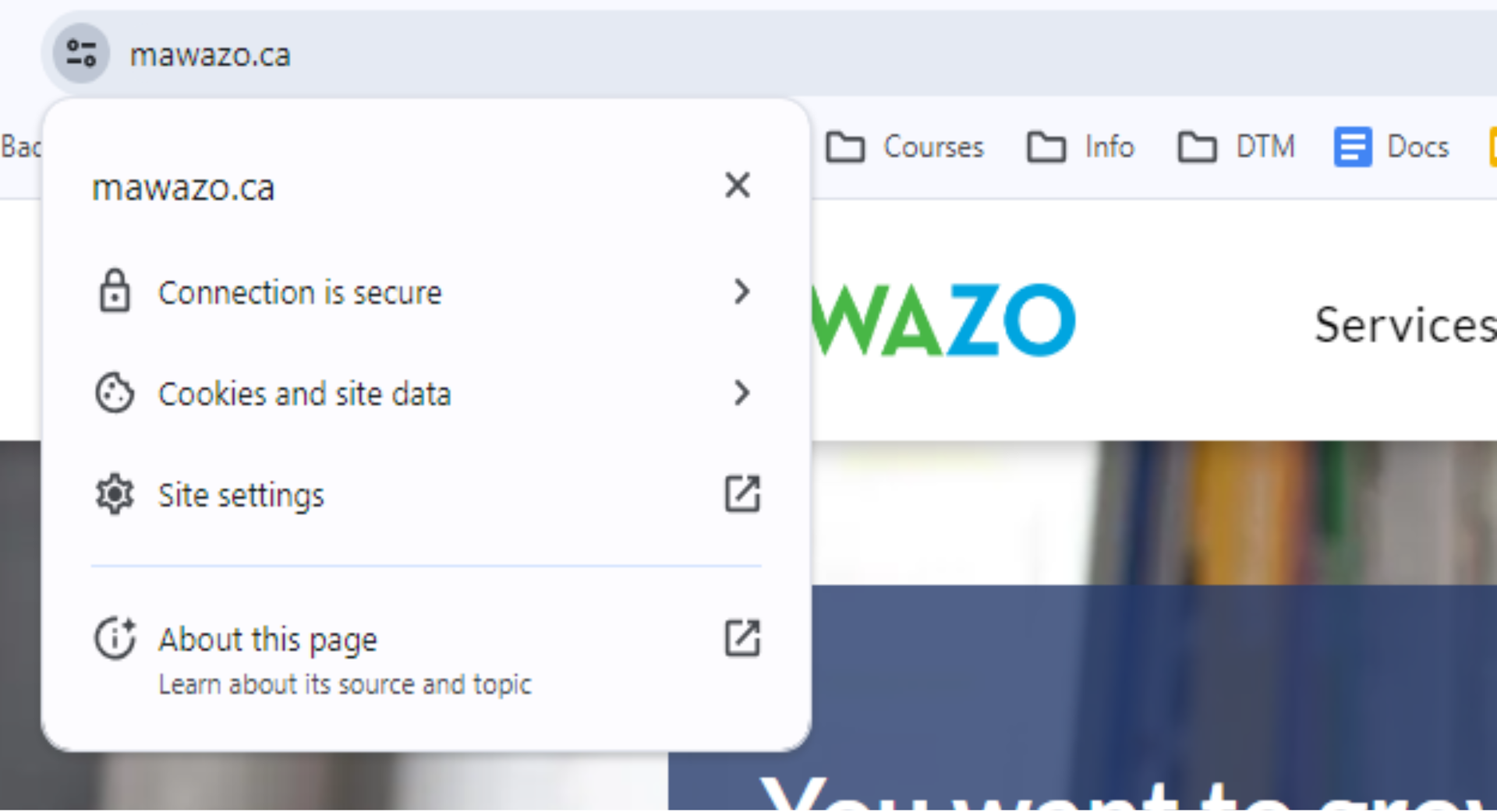
- Click the icon next to your web address in your browser. If it does not say "Connection is secure," this is a priority fix.
- Check the mobile-friendliness of your website with https://www.rankwatch.com/tools/mobile-friendly-check.html
Website Structure: Building Around Your Client, Not Yourself
One of the most common problems we see in B2B service websites is that they are organized around the company rather than the target audience: the homepage leads with “About Us,” the menu is structured around internal departments, and the language describes what the company does rather than what the client needs.
A good website is structured around the problems your ideal clients are trying to solve. They are not searching online for your company, they are searching for a solution to their problem. Are you making it clear that you can solve their problem, and that you are better at that than your competitors? An effective website answers those questions quickly and clearly.
Every page should have a clear purpose. Your homepage should quickly orient a website visitor: who you serve, what problems you solve, and why you are worth considering. Service pages should go deep on specific offerings, with enough relevant information that a buyer can self-qualify. Supporting pages should answer common questions and build confidence.
Quick Check: Structure (5 minutes)
Spend 5 minutes looking at your website through the eyes of your ideal client:
- Menu & Orientation (2 minutes): What is the first option in your website menu — “About Us” or “Services”? Would a first‑time visitor immediately see how you help them solve a specific pain or need?
- Service Coverage (2 minutes): Is there a page for every main product and service, not just a line in a list?
- Contact Paths (1 minute): Is there a clear and easy way to get in touch from every key page?
Web Design and UX: Making It Easy to Use
Good web design for a B2B service website is not about being impressive. It is about being clear.
Every user interface design decision should serve the visitor’s ability to understand and navigate. That means a consistent color palette that matches your brand identity. It means readable fonts at appropriate sizes. It means enough white space so that the eye is not overwhelmed and important information gets the attention it deserves.
Responsive design is essential. Your site must adapt its layout to whatever device is being used. A page that looks polished on a desktop and broken on a mobile device is a problem that costs you visitors and credibility.
Intuitive navigation matters just as much as visual appeal. A website visitor should never have to search for the information they need. If your site carries a large volume of content, a well-organized mega menu can help. The goal is that anyone can find what they are looking for in as few clicks as possible.
We also recommend thinking about accessibility. About 20% of your visitors have visual impairments or other needs. A site that is designed with accessibility in mind serves a wider audience and tends to score better on technical audits.
Watch out for red flags: cluttered pages, multiple competing fonts, menus that are hard to find on mobile, or pages where it is unclear what the visitor is supposed to do next. These friction points drive people away quietly and invisibly. Good website design eliminates all of them.
Quick Check: Mobile Site (5 minutes)
Visit your website on your mobile phone and check:
- Does it look good and feel uncluttered?
- Can you read the content without having to scroll horizontally?
- Is the font size comfortable to read?
- Can you fill in forms easily?
- Can you tap the phone number and call directly?
Content Quality: Saying the Right Things in the Right Places
Content is where most B2B service websites fall short. Not because there is too little website content. Often because what is there does not do the right job.
Quality content for a field service website does several things at once. It helps the right visitors self-identify. It builds trust by demonstrating competence. It educates buyers who are not yet ready to talk. And it gives search engines enough relevant material to understand what the site is about.
What Your Homepage Must Do
Your homepage is doing the most important work on your site. A website visitor should be able to look at it for thirty seconds and know who you serve, what problem you solve for them, how you are different from your competitors, and what to do next.
Here are the essentials that should be visible without much scrolling:
- Your ideal client and their core challenge
- Your core services
- At least one strong trust element
- A clear call to action
Service and Product Pages
Every service you offer should have its own dedicated page. Not a line item in a list. A full page with enough detail that a buyer can understand what the service involves, who it is for, and what outcome they can expect.
This matters for search engine optimization. It also matters for buyers who are doing their homework before they call. Thin, generic pages do not rank well and do not convert well either.
Ongoing Website Content
A blog or resource section serves two roles. It gives search engines fresh, structured data to index. And it gives buyers a reason to come back and engage before they are ready to talk.
The biggest mistake we see is neglected content. Blog posts from three years ago. Service descriptions that no longer match what the company actually does. Outdated information doesn’t just miss an opportunity, it actively damages trust and hurts your search engine ranking over time.
Quick Check: Content (15 minutes)
Set a timer for 15 minutes and review your site as if you were a new prospect:
- Homepage (5 minutes): In 30 seconds, can you answer: who you serve, what problem you solve, why you are credible, and what to do next? If not, highlight what is missing and add it above the fold or in the first scroll.
- Service Pages (5 minutes): List your top 3–5 services. Does each ne have its own page? On each page, check for: who it is for, what is included, and what outcome it delivers. If any service is just a paragraph in a bulleted list, mark it as needing a full page.
- Content Freshness
(5 minutes): Sort your blog/resources by date. Are your last 3–5 posts less than 6–12 months old and still accurate? Flag any obviously outdated posts or service descriptions for update or removal.
If your website content cannot pass this quick audit, you have a prioritized punch list to improve content quality without needing an SEO tool or a redesign.
Trust, Proof, and Authority: Showing You Are a Solid Partner
B2B buyers are risk-averse. Before they call you, they are quietly building a case in their head for whether you are worth the risk. Your website either helps them build that case or leaves them uncertain.
Trust signals reduce perceived risk. The most effective ones include client testimonials with real names and companies, logos of current clients or recognizable partners, case studies that show a specific result for a specific type of client, and certifications or association memberships that signal professional standards. Together, these elements are what we call social proof. They show potential customers that others like them have trusted you and been glad they did.
Social proof does not all need to live on the homepage. But your homepage should carry at least one or two strong trust signals. A buyer who does not see any evidence that others have trusted you will not be the first to take the leap.
Think about what a skeptical buyer is asking when they arrive at your site. Has this company done this for someone like me before? Did it work? Can I verify that? Your proof elements answer those questions. Place your most compelling social proof where it is most visible. Deeper case studies and detailed testimonials can live on interior pages. But do not hide all of your credibility two clicks down from the homepage.
Quick Check: Trust & Proof (10 minutes)
Walk through your site like a skeptical buyer and check:
- Homepage (3 minutes): Do you see at least one testimonial with a real name/company or a recognizable client logo on your homepage? If not, pick your strongest proof element and add it there.
- Service / Industry Pages (4 minutes): For your top 3 services or target industries, is there at least one specific proof point tied to each? For example, “Helped [Client] cut dispatch time by 30%”. If a page has zero proof, add a testimonial or mini case study.
- Depth of Proof (3 minutes):
Do you have 2–3 case studies on your website that show a clear before/after for “someone like me”? Are they easy to find from the main navigation (one click from the homepage)?
If you can’t answer “yes” to most of these, your next step is not more traffic. It is upgrading the proof your best prospects can see in their first 30–60 seconds on the site.
Conversion Paths and Clear CTAs: Guiding the Next Step
A well-built website does not just inform visitors. It guides them.
This is where a lot of B2B service sites leave money on the table. The information and the credibility are there. But there is no clear call to action (CTA) and no low-friction path for a visitor to take the next step.
For early-stage B2B buyers, a “Call us now” button is often too high-commitment. They are still in research mode and not ready to take the next step. A good website offers options that match different stages of readiness.
- A free guide or diagnostic that addresses a common pain point is a good top-of-funnel offer.
- A short self-assessment or checklist can help a mid-funnel visitor get clarity and move forward.
Every page should have a clear, logical next step. Not multiple competing CTAs pulling in different directions. One primary action that makes sense given what the page is about. We often find that adding one well-placed, well-worded CTA to a service page produces an immediate increase in inquiries. The visitor was interested, but they just did not know what to do next.
Quick CTA & Conversion Path Audit (10 minutes)
Spend 10 minutes checking whether visitors always know what to do next:
- Homepage (3 minutes): Is there one primary CTA above the fold that suits an early‑stage visitor (for example, “See how it works,” “Download the guide”) rather than only “Call us now”? If you have multiple competing buttons, choose one to be primary and simplify the rest.
- Service Pages (5 minutes): For each key service page, is there a single, logical next step that fits the page (for example, a short guide, checklist, or “Schedule a conversation”)? If a page has no clear CTA or only a generic “Contact us”, then note it for an upgraded service‑specific action.
- Path Check (2 minutes):
Start on your homepage and click through as a new visitor. Can you reach a relevant next step (guide, assessment, or conversation) in two clicks or fewer? If not, your quickest win is tightening those paths.
Search Engine Optimization: Getting Found by the Right People
Getting to the top of Google search results takes consistent effort over time. It is not a one-time fix. But there are three things that drive essentially all of it. They are worth understanding even if you are not doing the work yourself.
Website Structure and Technical Health
Search engines reward sites that are well-organized, fast, secure, and easy to navigate. This overlaps directly with the technical and structural foundations we have already covered. Good web design and strong search engine optimization are not separate disciplines. They reinforce each other.
Content Depth and Page-Level Focus
Each page on your site should focus on a specific topic or service. The website content should be deep enough to genuinely answer the questions a buyer is asking. Using relevant keywords naturally throughout your pages helps search engines understand what each page is about.
Backlinks and External Credibility
When other credible websites link to yours, it signals to search engines that your content is worth referencing. Examples of such “backlinks” are references from a business association or local newspaper website. They are earned over time through quality content, industry associations, and press mentions. It is one of the most important factors in organic traffic growth.
Understanding these three levers helps you ask better questions of your web agency or SEO vendor. You do not need to do the work yourself. But you should be able to evaluate whether the work is being done properly.
Quick SEO Health Check (10 minutes)
Set a timer for 10 minutes and review three basics:
- Technical Basics (3 minutes): Open your homepage and one key service page on mobile and desktop. Do they load quickly, use HTTPS, and feel easy to navigate? If they feel slow or clunky to you, flag them for your developer.
- Page Focus & Depth (4 minutes): Do your top product and service pages have enough detail to answer common questions? If a service is just a short paragraph then implement more detailed information.
- External Credibility (3 minutes):
List a few partners, associations, or suppliers you work with. Do any of them link to your site from theirs? If not, pick 2–3 realistic places where you could request a directory listing, partner profile, or case-study link to start building backlinks.
Integrating Your Website with Your Systems and Marketing Channels
A website that is not connected to your other systems is an island. It can generate inquiries, but what happens next depends entirely on whether someone manually checks the inbox and routes the lead correctly.
A well-integrated website connects to your CRM so that every form submission is automatically captured, tagged, and assigned. It connects to your email platform so that follow-up sequences trigger without manual effort. It connects to your analytics so that you can see which pages are driving results and which are not. Social media channels should also be connected, so that content and campaigns reinforce each other rather than operating in silos.
This integration is what transforms a website from a static brochure into a functioning part of your Marketing Operating System. Leads get followed up faster. Nothing falls through the cracks. The data from your website feeds into your broader picture of how your marketing is performing.
For field service companies that already operate FSM or ERP platforms, the same logic applies. When your website is connected to your operational systems, it reduces the double-handling of data and removes the human error that comes with manual input.
Quick Integration Check (5 minutes)
Spend 5 minutes checking whether your website is working as part of a real system:
- Lead Capture (2 minutes): Fill out a contact or quote form yourself. Does the lead show up automatically in your CRM (with tags/owner), and does an email follow‑up go out without anyone touching it? If not, note the gaps.
- Ops Connection (3 minutes):
For companies using FSM/ERP, check one recent web lead. Did their details make it into the operational system without manual re‑typing? If everything still relies on copy‑and‑paste, integration is your next efficiency win.
Measuring What Matters: Turning Your Site into a Continuous Improvement Engine
The last piece is measurement. And this is where most operators stop engaging entirely, because it can feel overwhelming. You do not need to track everything. You need to track the right things.
The core metrics we recommend for a B2B service website are:
- Total website traffic and where it is coming from
- Which pages are getting the most visits
- Time on page as indicators of content quality
- Conversion rate for key actions such as form submissions or phone calls
Google Analytics 4 is free and gives you access to these metrics and more. Make sure it is set up, review it once a month, and look for patterns. The goal is a steady habit of noticing what is working and making small, informed improvements over time. A website that is measured and improved incrementally will consistently outperform one that was built once and left alone. This is what separates a successful website from one that just takes up space.
Quick Analytics Check (10 minutes)
Take 10 minutes to make sure you are tracking the basics and using them:
- Setup (3 minutes): Confirm that Google Analytics 4 (or similar) is installed and receiving data. If you do not have a dynamic dashboard with traffic information, then flag this for implementation by your web team.
- Key Pages (4 minutes): Look at your top pages by traffic. Are visitors actually reaching your key service pages, or mostly landing on and leaving the homepage? Note any important pages with low views or high bounce rates.
- Conversions (3 minutes):
Check how many form fills or phone calls your site generated in the last 30 days and from which traffic sources. If you cannot see this at all, your next step is to set up basic goals/events so you can track real results, not just visits.
What to Do Next: A Short Self-Diagnostic
If you have read this far, you probably have a clearer picture of where your current website is falling short. To make that concrete, here are five questions worth sitting with this month.
- Does your homepage immediately communicate who you serve and what problem you solve for them? If a first-time visitor could not answer that in thirty seconds, the homepage needs work.
- Is your website technically sound? Run a quick check on speed, security, and mobile display. These are table stakes and they are often overlooked.
- Does every major service have its own dedicated page with real website content? Not a line item in a list. A full page that helps a buyer understand and self-qualify.
- Is there visible social proof that you have done this work before and that it delivered results? Testimonials, case studies, and client logos all matter.
- Does every page have clear CTAs and a logical next step for the visitor? If the answer is just “call us,” that is probably not enough for an early-stage buyer.
If you find that your website needs more than cosmetic changes, that is a sign you may benefit from a more structured approach. We work with field service companies that want their website to function as part of a broader Marketing Operating System, connected to their CRM, their operations platform, and their marketing channels.
The goal is a website that works harder than the one you have now, without adding more manual effort on your end. If that sounds like the kind of system your business needs, we are happy to review where you are starting from and show you what a connected Marketing Operating System could look like for your company.
Frequently Asked Questions
Do you have any questions on the above, or would you like to share your experience? Just email ideas@mawazo.ca or call +1 (833) 503-0807.
At Mawazo Marketing we work with owners of B2B companies who want to accelerate their business. We help them with a concrete digital growth plan, a website that saves operational cost, and a digital marketing system that generates leads. For qualifying clients we offer a 5x ROI guarantee: if we don't reach the objective, then we pay back the difference. Book a Free Strategy Session to find out more.