Organizing Your Content With a Hub Page: A Smarter SEO Content Strategy

Content Matters
If you're running field service operations across multiple locations, content management has never been your first priority. Between coordinating teams, tracking jobs across regions, and keeping customers happy, writing blog posts feels like the last thing you have time for.
Some companies we talk to have almost no content at all, maybe a basic website and that's it. Others have a handful of blogs, a news post from a few years ago, or a "resources" section that never went anywhere.
In both cases, the feeling is the same:
"We don't have time for content."
"We tried it once or twice and nothing happened."
"Even if we did write more, how would we actually use it to win work?"
The issue usually isn't that you can't do content. It's that whatever existing content you have isn't organized in a way that helps buyers find what they need and move toward working with you. That's a structure problem, and a Hub Page is the solution.
What a Hub Page Actually Is
A well-executed content strategy doesn't require publishing constantly. It requires organizing what you know around the questions your target audience is asking.
That's where a content hub comes in. It is a single, comprehensive guide on a broad topic your ideal customer cares about. Think of it as the home base for that topic on your website. Instead of sending people to a random blog post, you send them to one page that explains the big picture, breaks the topic into clear sections, and links to all the deeper resources you already have or will build over time.
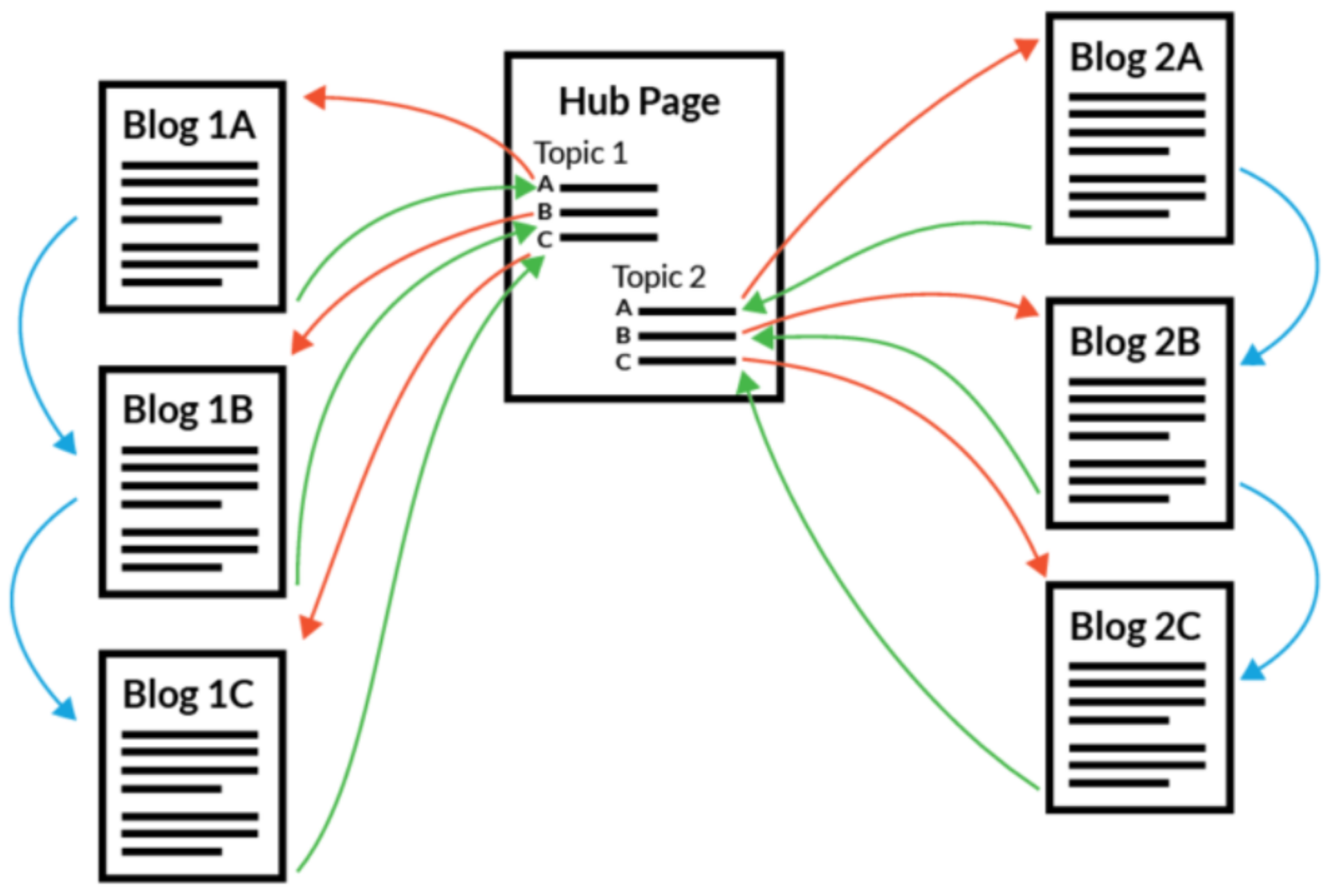
A Hub Page is like a content library your audience can return to. It consists of:
- A compelling title to the main topic, such as “The Ultimate Guide to ….”
- A description of 100-200 words of the main theme
- 4 to 8 sub-topics, each covering a specific angle with a compelling title
- A description for each sub-topic of at 50 -100 words
- Links to 5 or more pieces of content relevant for the sub-topic such as blogs, videos, checklists, and even resources on other websites.
A well-built content hub also anchors a lead magnet: a blueprint, checklist, or brief that a prospect can request in exchange for their contact information. The hub generates interest, and the lead magnet turns that engagement into leads.
For field service companies, this means your sales team finally has one link to send. When a prospect asks about your approach to multi-site maintenance contracts, you have a complete, organized answer ready.
Why Organizing Content Around a Hub Works Better for Busy Buyers
Your target audience is not searching for a single blog post. They're trying to understand a problem, evaluate their options, and figure out who they can trust. When they land on a scattered website they will leave. When they land on a content hub that answers their questions, then they stay and read more. They can see at a glance that you understand the full landscape of their problem. They can follow their own path based on what matters most to them right now.
We see this in our client work consistently. When prospects arrive at a well-structured content hub, they read more, click deeper, and arrive at sales conversations better prepared. It shortens the sales cycle and changes the quality of the conversation from "explain your services to me" to "here's what we're trying to solve."
For your sales team, the user experience is equally practical. Instead of sending three PDFs and four separate URLs, they share one page which does the educating. The salesperson can focus on listening and advising.
How Content Hubs Boost Search and AI Visibility
Search engines are trying to answer questions, not just match keywords. When someone types "IT Security for law firm," Google is looking for pages that show a clear, complete understanding of that topic. A hub page does exactly that.
Topical depth and authority
Because a hub page covers the big picture and links to detailed articles, it signals that you've gone deep on the subject, not just written one quick post. That breadth and depth are the same qualities that separated top-performing industrial sites in the audit above.
Clear internal links
When your hub links out to related content and those pages link back, it creates a tight content cluster around one topic. Search engines use these connections to understand what you're an authority on. This also gives you a natural structure for working relevant keywords across multiple pieces of quality content, without forcing them into a single page.
Better experience, stronger engagement signals
People stay longer, click into more pages, and are more likely to return when everything they need on a topic is easy to find. Those engagement signals reinforce your organic visibility over time.
AI search and overviews
As AI-driven summaries become more common in search, well-organized and comprehensive pages are significantly more likely to be surfaced and cited than isolated, stand-alone posts. A hub is built exactly the way AI tools like to retrieve content: organized, comprehensive, clearly structured around a topic.
What Content Hubs Do for Your Overall Marketing and Sales Engine
A content hub isn't just a nicer way to present your blogs. It quietly upgrades how your whole marketing strategy works.
For
content marketing, it becomes the anchor for a core topic. Instead of guessing what to write next, you have a clear structure: fill the gaps under each subtopic, improve the main page over time, and know that every piece of relevant content has a home. Existing content that was buried on your site now has a clear role inside a bigger story. It’s one of the fastest ways to improve your seo efforts without starting from scratch.
For
sales teams, it becomes a practical tool. One link to send a prospect who is early in their thinking. One page that walks through the big picture and lets the buyer choose what to dig into.
Real-World Examples
It helps to see what this looks like in practice. Here are three hub pages we've built in different B2B service contexts. The industries are different; the structure and outcome are the same.
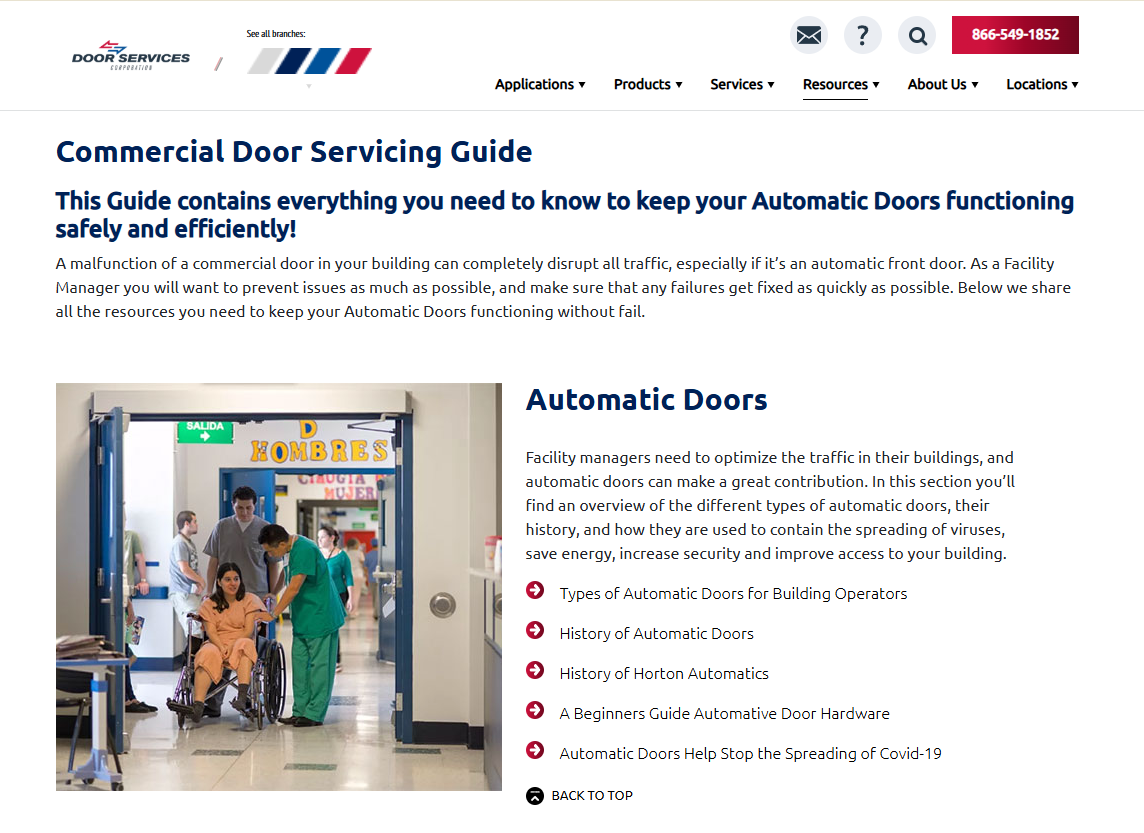
Example 1: Automatic Doors Service & Maintenance
Door Services Corporation offers installation, maintenance and repair services for automatic doors across 20+ locations in the USA and Canada. The hub page gives facility managers one destination to return to when they're planning maintenance, troubleshooting a breakdown, or preparing for an inspection.
https://doorservicescorporation.com/resources/commercial-door-servicing-guide
Example 2: IT Security
Digital Fire is an Oakville-based managed IT services provider that helps small and mid-sized businesses improve operational efficiency with the latest technology. This hub is for small and mid-sized business owners who know they should be taking IT security more seriously but aren't sure where to start.
https://www.digitalfire.ca/resources/navigating-it-security/navigating-it-security-a-comprehensive-guide-for-businesses

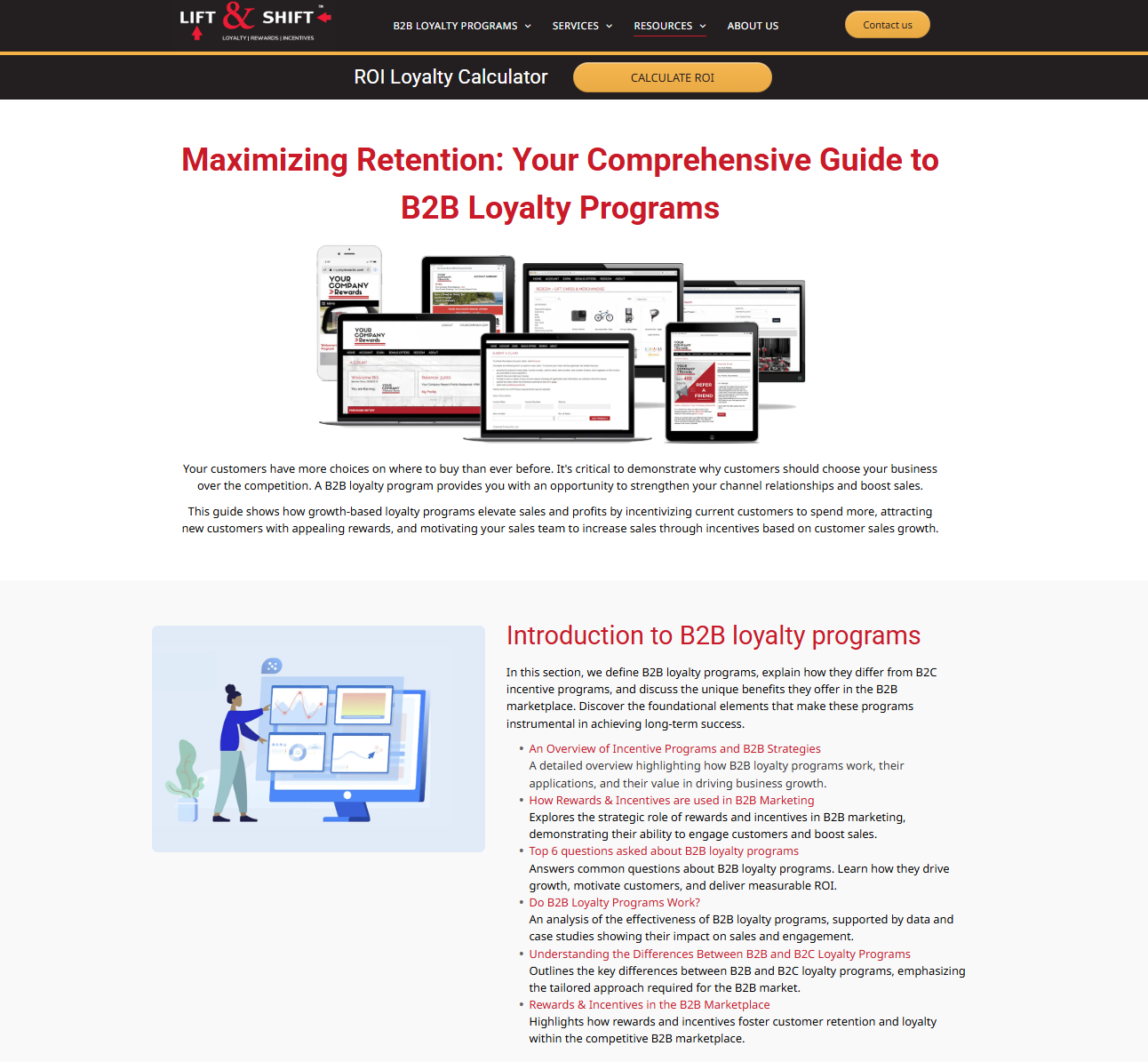
Example 3: B2B Loyalty Programs
Lift & Shift helps its clients increase profits and customer loyalty with a behavior-based, data-driven, full-service B2B reward and incentive programs. The hub page is built for B2B sales and marketing leaders exploring whether a loyalty or incentive program is right for their business, and offers case studies with specific results including a 179% sales lift, giving skeptical buyers the proof points they need to move forward.
https://www.lift-and-shift.com/the-ultimate-guide-to-b2b-loyalty-programs
First Steps: Mapping Your Own Content Hub
You need one well-organized starting point on a topic your best customers care about, and you need to build it with a clear understanding of your target audience and what actually matters to them. At Mawazo, we start every content hub the same way we start every engagement: with strategy.
Here's the process we use:
- Clarify your Ideal Client and map their main problems and concerns.
- Pick one broad, high-value topic: a problem or goal your ideal client is actively searching for.
- List the real questions your clients ask about that topic. Group those into four to eight subtopics.
- Take stock of the existing content you already have that fits underneath each subtopic.
You don't need dozens of new blog posts to make progress. In most cases, companies already have more relevant material than they realize. It may be buried in past proposals or service descriptions, and in the blogs and case studies you already have. You may have recorded a video of a training, which can be converted into blogs. The content hub gives all of it a home, a structure, and a place in your overall digital marketing strategy.
Ready to Map Your First Hub Page?
If you'd like help mapping your first content hub, we can review your current site, identify your highest-value topic, and sketch the complete structure together in a short working session. You'll leave with a clear map of what you have, what's missing, and what to build next — further, faster.
This is paragraph text. Click it or hit the Manage Text button to change the font, color, size, format, and more. To set up site-wide paragraph and title styles, go to Site Theme.
Frequently Asked Questions
Do you have any questions on the above, or would you like to share your experience? Just email [email protected] or call +1 (833) 503-0807.
At Mawazo Marketing we work with owners of B2B companies who want to accelerate their business. We help them with a concrete digital growth plan, a website that saves operational cost, and a digital marketing system that generates leads. For qualifying clients we offer a 5x ROI guarantee: if we don't reach the objective, then we pay back the difference. Book a Free Strategy Session to find out more.